

Gitflow workflow tutorial
If you plan to use the Gitflow workflow in your software development project, the first thing you need to do after Git and Gitflow are installed is run the “git flow init” command.
In this tutorial, we’ll initialize Gitflow and follow a complete workflow through feature development and a release. This example uses main as the production branch and development as the integration branch.
Gitflow is still useful for teams that deliberately maintain release branches or support multiple versions, but it is not the only modern Git branching model. Teams that deploy continuously often prefer short-lived branches and trunk-based development. Use Gitflow when its explicit feature, release and hotfix lifecycle matches the way your team ships software.
Change the master and develop branches to main and development. We leave the rest at their defaults.
GitFlowInit@Example MINGW64 /c/git-flow-tutorial

$ git flow init

Initialized empty Git repository in C:/_tools/temp/my-git-flow/.git/

No branches exist yet. Base branches must be created now.

Branch name for production releases: [master] main

Branch name for "next release" development: [develop] development

How to name your supporting branch prefixes?

Feature branches? [feature/]

Bugfix branches? [bugfix/]

Release branches? [release/]

Hotfix branches? [hotfix/]

Support branches? [support/]

Version tag prefix? []

Hooks and filters directory? [C:/_tools/temp/my-git-flow/.git/hooks]
After initialization, Gitflow is configured around two long-lived branches: main for production releases and development for integration work.
GitFlowInit@Example MINGW64 /c/git-flow-tutorial (development)

$ git branch -a

* development

main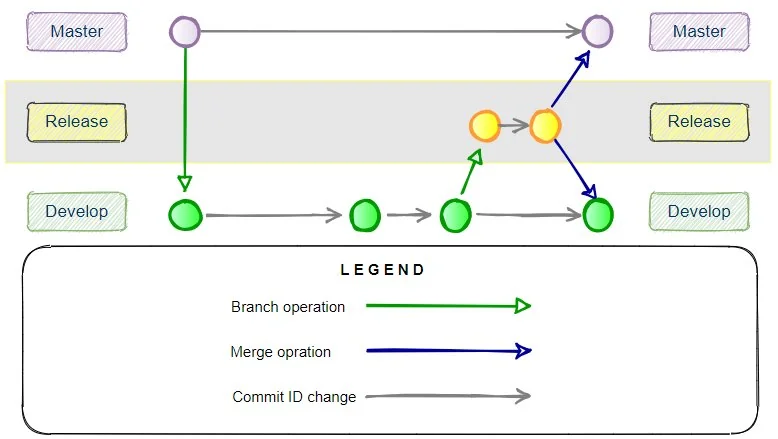
The Gitflow release branch is made from the develop branch and gets merged into both master and develop when finished.
This creates feature/feature_branch from the configured development branch and checks it out.
GitFlowInit@Example MINGW64 /c/git-flow-tutorial (development)

$ git flow feature start feature_branch

Switched to a new branch 'feature/feature_branch'
Summary of actions:
- A new branch “feature/feature_branch” was created, based on “development.”
- You are now on branch “feature/feature_branch.”
Now, start committing on your feature. When done, use:
git flow feature finish feature_branchThere are now three branches.
GitFlowInit@Example MINGW64 /c/git-flow-tutorial (feature/feature_branch)

$ git branch -a

development

* feature/feature_branch

main
Add a file to represent a feature and then do a Git commit.
GitFlowInit@Example MINGW64 /c/git-flow-tutorial (feature/feature_branch)

$ touch feature.html

GitFlowInit@Example MINGW64 /c/git-flow-tutorial (feature/feature_branch)

$ ls

feature.html

GitFlowInit@Example MINGW64 /c/git-flow-tutorial (feature/feature_branch)

$ git add .

GitFlowInit@Example MINGW64 /c/git-flow-tutorial (feature/feature_branch)

$ git commit -m "feature complete!"

[feature/feature_branch f2e257f] feature complete!

1 file changed, 0 insertions(+), 0 deletions(-)

create mode 100644 feature.html
To inspect the commit history, use git log. The reflog is useful for recovering or auditing local reference movements, but it is not the normal command for viewing project history.
GitFlowInit@Example MINGW64 /c/git-flow-tutorial (feature/feature_branch)

$ git log --oneline --decorate --graph --all

f2e257f (HEAD -> feature/feature_branch) HEAD@{0}: commit: feature complete!

8fdc0d7 (main, development) HEAD@{1}: checkout: moving from development to feature/feature_branch

8fdc0d7 (main, development) HEAD@{2}: checkout: moving from main to development

8fdc0d7 (main, development) HEAD@{3}: commit (initial): Initial commit
Finish work on the feature branch. This merges and deletes it.
GitFlowInit@Example MINGW64 /c/git-flow-tutorial (feature/feature_branch)

$ git flow feature finish feature_branch

Switched to branch 'development'

Updating 8fdc0d7..f2e257f

Fast-forward

feature.html | 0

1 file changed, 0 insertions(+), 0 deletions(-)

create mode 100644 feature.html

Deleted branch feature/feature_branch (was f2e257f).
Summary of actions:
- The feature branch
feature/feature_branchwas merged intodevelopment. - The local
feature/feature_branchbranch was deleted. - You are now on the
developmentbranch.
Notice how the feature branch is now gone.
GitFlowInit@Example MINGW64 /c/git-flow-tutorial (development)

$ git branch -a

* development

main
There are no tags on the repo yet.
GitFlowInit@Example MINGW64 /c/git-flow-tutorial (development)

$ git tag -l
Start a “git flow release” branch.
GitFlowInit@Example MINGW64 /c/git-flow-tutorial (development)

$ git flow release start '0.1.0'

Switched to a new branch 'release/0.1.0'
Summary of actions:
- A new branch “release/0.1.0” was created, based on “development.”
- You are now on branch “release/0.1.0”
Follow-up actions:
- Bump the version number now!
- Start committing last-minute fixes in preparing your release.
- When done, run:
git flow release finish '0.1.0'We now have three branches.
GitFlowInit@Example MINGW64 /c/git-flow-tutorial (release/0.1.0)

$ git branch -a

development

main

* release/0.1.0
Add a file to represent a fix and do a Git commit.
GitFlowInit@Example MINGW64 /c/git-flow-tutorial (release/0.1.0)

$ touch release-fix.html

GitFlowInit@Example MINGW64 /c/git-flow-tutorial (release/0.1.0)

$ git add .

GitFlowInit@Example MINGW64 /c/git-flow-tutorial (release/0.1.0)

$ git commit -m "release fixed"

[release/0.1.0 c1f756f] release fixed

1 file changed, 0 insertions(+), 0 deletions(-)

create mode 100644 release-fix.html
Finish the release branch to merge it and delete it.
GitFlowInit@Example MINGW64 /c/git-flow-tutorial (release/0.1.0)

$ git flow release finish '0.1.0'

Switched to branch 'main'

Merge made by the 'recursive' strategy.

feature.html | 0

release-fix.html | 0

2 files changed, 0 insertions(+), 0 deletions(-)

create mode 100644 feature.html

create mode 100644 release-fix.html

Already on 'main'

Switched to branch 'development'

Merge made by the 'recursive' strategy.

release-fix.html | 0

1 file changed, 0 insertions(+), 0 deletions(-)

create mode 100644 release-fix.html

Deleted branch release/0.1.0 (was c1f756f).
Summary of actions:
- Release branch “release/0.1.0” has been merged into “main.”
- The release was tagged “0.1.0”.
- Release tag “0.1.0” has been back-merged into “development.”
- Release branch “release/0.1.0” has been locally deleted.
- You are now on branch “development.”
Note we are back to two branches.
GitFlowInit@Example MINGW64 /c/git-flow-tutorial (development)

$ git branch -a

* development

main
All of the files have been merged into the development branch.
GitFlowInit@Example MINGW64 /c/git-flow-tutorial (development)

$ ls

feature.html release-fix.html

GitFlowInit@Example MINGW64 /c/git-flow-tutorial (development)

$ git checkout main

Switched to branch 'main'
All of the release changes have also been merged into the main production branch.
GitFlowInit@Example MINGW64 /c/git-flow-tutorial (main)

$ ls

feature.html release-fix.html
Finishing the release also creates the configured release tag.
GitFlowInit@Example MINGW64 /c/git-flow-tutorial (main)

$ git tag -l

0.1.0
Push the Gitflow release and tags
The commands above demonstrate the local Gitflow lifecycle. In a real project, push the updated long-lived branches and release tags to the remote repository:
git push origin main
git push origin development
git push origin --tags
If your team protects main or development, use the organization’s pull-request or merge-request process instead of pushing directly.
That completes the core Gitflow workflow, starting with git flow init and ending with the release merged into main, back-merged into development and tagged.
Note that this Gitflow workflow did not include the hotfix branch as shown below. But that one branch aside, this was a fairly complete Gitflow example.
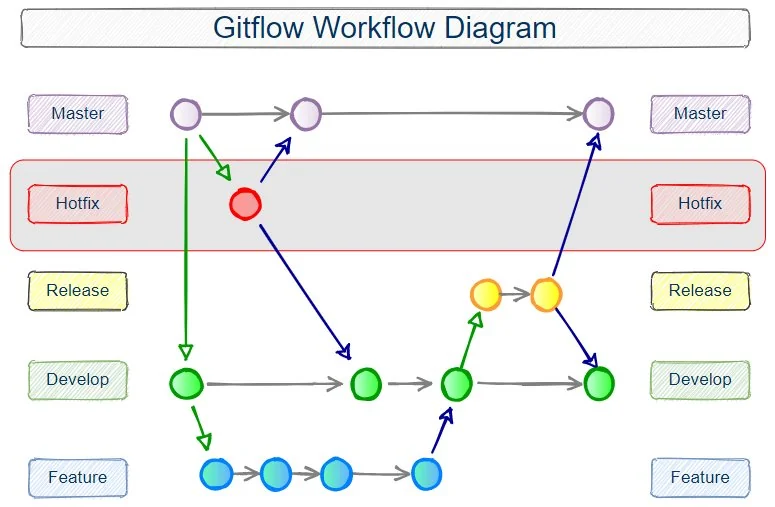
The Gitflow hotfix branch is one part of the larger Gitflow workflow.