

If a developer wants to build a workflow, shell script or build job of any merit, they’ll need to take advantage of the various GitHub Actions environment variables that are available through the tool.
The standard documentation pages tell developers about the default GitHub Actions environment variables, which are prefixed with the string GITHUB and includes variables such as GITHUB_WORKFLOW, GITHUB_RUN_ID and GITHUB_ACTION. However, that’s by no means the full list of GitHub Actions environment variables available to developers when they create workflows on Ubuntu, Linus or MacOS.
Each container where continuous integration builds run offers a full suite of environment variables that the shell scripts and workflows should take advantage of. We’ll examine the full list of GitHub Actions environment variables, and more importantly, I’ll show you how to write a simple workflow so a developer can inspect their own environment and see for themselves what variables are available to use.
| Git, GitHub & GitHub Copilot Certification Made Easy |
|---|
| Want to get certified on the most popular AI, ML & DevOps technologies of the day? These five resources will help you get GitHub certified in a hurry.
Get certified in the latest AI, ML and DevOps technologies. Advance your career today. |
Default GitHub Actions environment variables
The 18 default environment variables available to any GitHub Actions workflow or shell script are:
- CI
- GITHUB_WORKFLOW
- GITHUB_RUN_ID
- GITHUB_RUN_NUMBER
- GITHUB_ACTION
- GITHUB_ACTIONS
- GITHUB_ACTOR
- GITHUB_REPOSITORY
- GITHUB_EVENT_NAME
- GITHUB_EVENT_PATH
- GITHUB_WORKSPACE
- GITHUB_SHA
- GITHUB_REF
- GITHUB_HEAD_REF
- GITHUB_BASE_REF
- GITHUB_SERVER_URL
- GITHUB_API_URL
- GITHUB_GRAPHQL_URL
Full GitHub Actions environment variables List
While that’s an impressive list, if a developer is doing a build on the ubuntu-latest image, their build workflows have over 60 more GitHub Actions environment variables at their disposal. While they’re standard issue, they differ from distro to distro. For example, the macos-latest may have a few more or a few less variables available than ubuntu-latest.
Take the PATH variable for example, that’s available on windows-latest. But for obvious reasons, it’s not available on ubuntu-latest because Linux distros don’t have a configurable PATH.
In fairness, this example combines what some might consider system variables with the environment variables specifically provided by the continuous integration framework. But since all these system and environment variables are available to GitHub Action workflows and scripts, I don’t feel guilty about combining them in a single discussion.
GitHub Actions environment variables shell script
The full list of 81 or so environment and system variables is further down in this article. But there’s always a chance that the list will get outdated as soon as a new container is configured. Developers shouldn’t solely rely on what’s written here, and instead they should inspect their runtime container on their own to find out.
Here’s a simple YAML file that allows developers to inspect GitHub Actions environment variables on Windows, MacOS and Ubuntu. And if they’ve already got a GitHub account of their own, it’ll only take about two minutes to configure it.
GitHub Actions variables list script
The steps used in the following workflow to print out all GitHub Actions environment variables are:
- Create a simple YAML file that runs on a push to main or master
- Add three jobs, one for each of Ubuntu, Windows and MacOS
- Run a single GitHub Action step in each job that simply invokes the env command
- Run the build
- View the GitHub Action environment variable list in the job status window
# Publish GitHub workflow artifacts tutorial example
name: Publish GitHub Actions Artifacts Example
on:
  push:
    branches: [ main ]
jobs:
  github-actions-environment-variables-ubuntu:
    runs-on: ubuntu-latest
    steps:
      - name: List of the GitHub Actions environment variables on Windows
        run: env
  github-actions-environment-variables-windows:
    runs-on: windows-latest
    steps:
      - name: Ubuntu GitHub Actions environment variables List
        run: env
  github-actions-environment-variables-macos:
    runs-on: macos-latest
    steps:
      - name: MacOs List of GitHub Actions environment variables
        run: env
Environment variables workflow example
When a developer uses the env command, it forces the container of interest to print out all its environment variables to the console. So, when this simple workflow runs, we get a GitHub Actions environment variables list for Ubuntu, Windows and the MacOS. Developers should run this script any time the latest version of a given container is updated and they’ll know if any new environment variables have been added or removed.
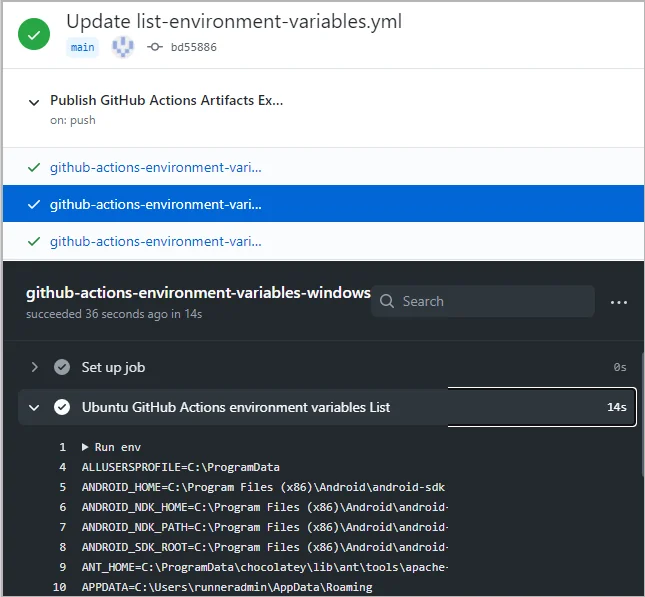
A full list of the GitHub Actions environment variables can be pulled from a simple workflow.
What’s the full list of GitHub Actions environment variables look like? Well, here they are, all 123 of them as they appear in the ubuntu-latest. Windows and MacOS are listed below.
However, your local power grid may not have enough energy to allow you to scroll down fully.
Ubuntu GitHub Actions Environment Variables List
Here are the 81 environment variables the ubuntu-latest GitHub Actions runner spit out:
LEIN_HOME=/usr/local/lib/lein


M2_HOME=/usr/share/apache-maven-3.6.3


GOROOT_1_11_X64=/opt/hostedtoolcache/go/1.11.13/x64


ANDROID_HOME=/usr/local/lib/android/sdk


JAVA_HOME_11_X64=/usr/lib/jvm/adoptopenjdk-11-hotspot-amd64


ImageVersion=20201102.0


AGENT_TOOLSDIRECTORY=/opt/hostedtoolcache


LANG=C.UTF-8


AZURE_EXTENSION_DIR=/opt/az/azcliextensions


POWERSHELL_DISTRIBUTION_CHANNEL=GitHub-Actions-ubuntu18


GITHUB_API_URL=https://api.github.com


INVOCATION_ID=3e31b357ddec4640a495a5c29ee579d2


BOOST_ROOT_1_72_0=/opt/hostedtoolcache/boost/1.72.0/x64


JAVA_HOME_12_X64=/usr/lib/jvm/adoptopenjdk-12-hotspot-amd64


ANDROID_SDK_ROOT=/usr/local/lib/android/sdk


RUNNER_TOOL_CACHE=/opt/hostedtoolcache


SWIFT_PATH=/usr/share/swift/usr/bin


JAVA_HOME=/usr/lib/jvm/adoptopenjdk-8-hotspot-amd64


RUNNER_TRACKING_ID=github_3ed81378-e0f3-42a1-8218-a31082ce8928


DOTNET_MULTILEVEL_LOOKUP="0"


GITHUB_REPOSITORY_OWNER=learn-github-actions


GITHUB_ACTIONS=true


DOTNET_SKIP_FIRST_TIME_EXPERIENCE="1"


CI=true


DOTNET_NOLOGO="1"


USER=runner


GITHUB_HEAD_REF=


GITHUB_ACTOR=learn-github-actions


GITHUB_ACTION=run


GRADLE_HOME=/usr/share/gradle


PWD=/home/runner/work/getting-started-github-actions/getting-started-github-actions


ImageOS=ubuntu18


PIPX_HOME="/opt/pipx"


HOME=/home/runner


GOROOT=/opt/hostedtoolcache/go/1.14.10/x64


JOURNAL_STREAM=9:30209


GOROOT_1_14_X64=/opt/hostedtoolcache/go/1.14.10/x64


JAVA_HOME_8_X64=/usr/lib/jvm/adoptopenjdk-8-hotspot-amd64


RUNNER_TEMP=/home/runner/work/_temp


GITHUB_RETENTION_DAYS=90


GOROOT_1_15_X64=/opt/hostedtoolcache/go/1.15.3/x64


CONDA=/usr/share/miniconda


GOROOT_1_13_X64=/opt/hostedtoolcache/go/1.13.15/x64


BOOST_ROOT_1_69_0=/opt/hostedtoolcache/boost/1.69.0/x64


GITHUB_ENV=/home/runner/work/_temp/_runner_file_commands/set_env_d3cc9327-7bd4-4c6e-bdc7-1b8aeda25deb


DEBIAN_FRONTEND=noninteractive


RUNNER_WORKSPACE=/home/runner/work/getting-started-github-actions


GITHUB_REF=refs/heads/main


GITHUB_SHA=bd55886e2fdb736df000375418c501abca2d3721


GITHUB_RUN_ID=356470921


GITHUB_SERVER_URL=https://github.com


GOROOT_1_12_X64=/opt/hostedtoolcache/go/1.12.17/x64


GECKOWEBDRIVER=/usr/local/share/gecko_driver


DEPLOYMENT_BASEPATH=/opt/runner


GITHUB_EVENT_PATH=/home/runner/work/_temp/_github_workflow/event.json


CHROMEWEBDRIVER=/usr/local/share/chrome_driver


PIPX_BIN_DIR="/opt/pipx_bin"


HOMEBREW_REPOSITORY="/home/linuxbrew/.linuxbrew/Homebrew"


GITHUB_GRAPHQL_URL=https://api.github.com/graphql


RUNNER_OS=Linux


GITHUB_BASE_REF=


VCPKG_INSTALLATION_ROOT=/usr/local/share/vcpkg


GITHUB_PATH=/home/runner/work/_temp/_runner_file_commands/add_path_d3cc9327-7bd4-4c6e-bdc7-1b8aeda25deb


GITHUB_JOB=github-actions-environment-variables-ubuntu


PERFLOG_LOCATION_SETTING=RUNNER_PERFLOG


JAVA_HOME_7_X64=/usr/lib/jvm/zulu-7-azure-amd64


RUNNER_USER=runner


SHLVL=1


HOMEBREW_PREFIX="/home/linuxbrew/.linuxbrew"


GITHUB_REPOSITORY=learn-github-actions/getting-started-github-actions


GITHUB_EVENT_NAME=push


LEIN_JAR=/usr/local/lib/lein/self-installs/leiningen-2.9.4-standalone.jar


GITHUB_RUN_NUMBER=2


RUNNER_PERFLOG=/home/runner/perflog


GITHUB_WORKFLOW=Publish GitHub Actions Artifacts Example


ANT_HOME=/usr/share/ant


PATH=/home/linuxbrew/.linuxbrew/bin:/home/linuxbrew/.linuxbrew/sbin:/opt/pipx_bin:/usr/share/rust/.cargo/bin:/home/runner/.config/composer/vendor/bin:/home/runner/.dotnet/tools:/snap/bin:/usr/local/sbin:/usr/local/bin:/usr/sbin:/usr/bin:/sbin:/bin:/usr/games:/usr/local/games:/snap/bin


SELENIUM_JAR_PATH=/usr/share/java/selenium-server-standalone.jar


GITHUB_WORKSPACE=/home/runner/work/getting-started-github-actions/getting-started-github-actions


CHROME_BIN=/usr/bin/google-chrome


HOMEBREW_CELLAR="/home/linuxbrew/.linuxbrew/Cellar"


_=/usr/bin/env
GitHub Actions Environment Variables List on MacOS
And here are the 80 environment variables the MacOS GitHub Actions runner listed:
GITHUB_JOB=github-actions-environment-variables-macos


GITHUB_EVENT_PATH=/Users/runner/work/_temp/_github_workflow/event.json


RUNNER_OS=macOS


XCODE_12_DEVELOPER_DIR=/Applications/Xcode_12.1.app/Contents/Developer


GITHUB_BASE_REF=


NVM_CD_FLAGS=


ANDROID_HOME=/Users/runner/Library/Android/sdk


SHELL=/bin/bash


CHROMEWEBDRIVER=/usr/local/Caskroom/chromedriver/86.0.4240.22


PIPX_BIN_DIR=/usr/local/opt/pipx_bin


GITHUB_REPOSITORY_OWNER=learn-github-actions


TMPDIR=/var/folders/24/8k48jl6d249_n_qfxwsl6xvm0000gn/T/


GITHUB_RUN_NUMBER=2


GITHUB_ACTIONS=true


ANDROID_SDK_ROOT=/Users/runner/Library/Android/sdk


RUNNER_WORKSPACE=/Users/runner/work/getting-started-github-actions


RCT_NO_LAUNCH_PACKAGER=1


JAVA_HOME_8_X64=/Library/Java/JavaVirtualMachines/adoptopenjdk-8.jdk/Contents/Home


NUNIT_BASE_PATH=/Library/Developer/nunit


RUNNER_PERFLOG=/usr/local/opt/runner/perflog


GITHUB_WORKFLOW=Publish GitHub Actions Artifacts Example


GITHUB_REF=refs/heads/main


NUNIT3_PATH=/Library/Developer/nunit/3.6.0


LC_ALL=en_US.UTF-8


RUNNER_TOOL_CACHE=/Users/runner/hostedtoolcache


JAVA_HOME_11_X64=/Library/Java/JavaVirtualMachines/adoptopenjdk-11.jdk/Contents/Home


JAVA_HOME_14_X64=/Library/Java/JavaVirtualMachines/adoptopenjdk-14.jdk/Contents/Home


NVM_DIR=/Users/runner/.nvm


USER=runner


GITHUB_API_URL=https://api.github.com


GITHUB_EVENT_NAME=push


GITHUB_SHA=bd55886e2fdb736df000375418c501abca2d3721


XCODE_10_DEVELOPER_DIR=/Applications/Xcode_10.3.app/Contents/Developer


RUNNER_TEMP=/Users/runner/work/_temp


ImageVersion=20201107.1


SSH_AUTH_SOCK=/private/tmp/com.apple.launchd.fd1ZVGpP4V/Listeners


GITHUB_SERVER_URL=https://github.com


__CF_USER_TEXT_ENCODING=0x1F5:0:0


HOMEBREW_NO_AUTO_UPDATE=1


GITHUB_HEAD_REF=


AGENT_TOOLSDIRECTORY=/Users/runner/hostedtoolcache


GITHUB_GRAPHQL_URL=https://api.github.com/graphql


PATH=/usr/local/opt/pipx_bin:/Users/runner/.cargo/bin:/usr/local/lib/ruby/gems/2.7.0/bin:/usr/local/opt/ruby/bin:/usr/local/opt/curl/bin:/usr/local/bin:/usr/local/sbin:/Users/runner/bin:/Users/runner/.yarn/bin:/usr/local/go/bin:/Users/runner/Library/Android/sdk/tools:/Users/runner/Library/Android/sdk/platform-tools:/Users/runner/Library/Android/sdk/ndk-bundle:/Library/Frameworks/Mono.framework/Versions/Current/Commands:/usr/bin:/bin:/usr/sbin:/sbin:/Users/runner/.dotnet/tools:/Users/runner/.ghcup/bin:/Users/runner/hostedtoolcache/stack/2.5.1/x64


_=/usr/bin/env


GITHUB_RETENTION_DAYS=90


PERFLOG_LOCATION_SETTING=RUNNER_PERFLOG


CONDA=/usr/local/miniconda


EDGEWEBDRIVER=/usr/local/share/edge_driver


PWD=/Users/runner/work/getting-started-github-actions/getting-started-github-actions


DOTNET_ROOT=/Users/runner/.dotnet


JAVA_HOME=/Library/Java/JavaVirtualMachines/adoptopenjdk-8.jdk/Contents/Home


VCPKG_INSTALLATION_ROOT=/usr/local/share/vcpkg


JAVA_HOME_7_X64=/Library/Java/JavaVirtualMachines/zulu-7.jdk/Contents/Home


JAVA_HOME_12_X64=/Library/Java/JavaVirtualMachines/adoptopenjdk-12.jdk/Contents/Home


LANG=en_US.UTF-8


ImageOS=macos1015


XPC_FLAGS=0x0


PIPX_HOME=/usr/local/opt/pipx


GITHUB_ACTOR=learn-github-actions


XPC_SERVICE_NAME=0


GECKOWEBDRIVER=/usr/local/opt/geckodriver/bin


SHLVL=2


HOME=/Users/runner


RUNNER_TRACKING_ID=github_55227cb1-2fd1-40f7-8c27-cd2ac3605153


GITHUB_WORKSPACE=/Users/runner/work/getting-started-github-actions/getting-started-github-actions


ANDROID_NDK_18R_PATH=/Users/runner/Library/Android/sdk/ndk/18.1.5063045


CI=true


GITHUB_RUN_ID=356470921


LOGNAME=runner


GITHUB_ENV=/Users/runner/work/_temp/_runner_file_commands/set_env_52fb4442-e3d2-49d0-956f-d7326c15833e


LC_CTYPE=en_US.UTF-8


JAVA_HOME_13_X64=/Library/Java/JavaVirtualMachines/adoptopenjdk-13.jdk/Contents/Home


HOMEBREW_CASK_OPTS=--no-quarantine


POWERSHELL_DISTRIBUTION_CHANNEL=GitHub-Actions-macos1015


ANDROID_NDK_HOME=/Users/runner/Library/Android/sdk/ndk-bundle


BOOTSTRAP_HASKELL_NONINTERACTIVE=1


XCODE_11_DEVELOPER_DIR=/Applications/Xcode_11.7.app/Contents/Developer


GITHUB_REPOSITORY=learn-github-actions/getting-started-github-actions


GITHUB_PATH=/Users/runner/work/_temp/_runner_file_commands/add_path_52fb4442-e3d2-49d0-956f-d7326c15833e


GITHUB_ACTION=run


DOTNET_MULTILEVEL_LOOKUP=0
Environment Variables for GitHub Actions on Windows
The windows-latest container takes first place in the GitHub Actions environment variables race with a listing of 120:
ALLUSERSPROFILE=C:\ProgramData


ANDROID_HOME=C:\Program Files (x86)\Android\android-sdk


ANDROID_NDK_HOME=C:\Program Files (x86)\Android\android-sdk\ndk-bundle


ANDROID_NDK_PATH=C:\Program Files (x86)\Android\android-sdk\ndk-bundle


ANDROID_SDK_ROOT=C:\Program Files (x86)\Android\android-sdk


ANT_HOME=C:\ProgramData\chocolatey\lib\ant\tools\apache-ant-1.10.9


APPDATA=C:\Users\runneradmin\AppData\Roaming


AZURE_EXTENSION_DIR=C:\Program Files\Common Files\AzureCliExtensionDirectory


BOOST_ROOT_1_69_0=C:\hostedtoolcache\windows\Boost\1.69.0\x86_64


BOOST_ROOT_1_72_0=C:\hostedtoolcache\windows\Boost\1.72.0\x86_64


ChocolateyInstall=C:\ProgramData\chocolatey


ChromeWebDriver=C:\SeleniumWebDrivers\ChromeDriver


CI=true


COBERTURA_HOME=C:\cobertura-2.1.1


COMMONPROGRAMFILES=C:\Program Files\Common Files


CommonProgramFiles(x86)=C:\Program Files (x86)\Common Files


CommonProgramW6432=C:\Program Files\Common Files


COMPUTERNAME=fv-az108-346


COMSPEC=C:\windows\system32\cmd.exe


CONDA=C:\Miniconda


DEPLOYMENT_BASEPATH=C:\actions


DOTNET_MULTILEVEL_LOOKUP=0


DriverData=C:\Windows\System32\Drivers\DriverData


EdgeWebDriver=C:\SeleniumWebDrivers\EdgeDriver


GCM_INTERACTIVE=Never


GeckoWebDriver=C:\SeleniumWebDrivers\GeckoDriver


GITHUB_ACTION=run


GITHUB_ACTIONS=true


GITHUB_ACTOR=learn-github-actions


GITHUB_API_URL=https://api.github.com


GITHUB_BASE_REF=


GITHUB_ENV=D:\a\_temp\_runner_file_commands\set_env_b6f2af2e-458c-4990-b67f-6f9a9d664614


GITHUB_EVENT_NAME=push


GITHUB_EVENT_PATH=D:\a\_temp\_github_workflow\event.json


GITHUB_GRAPHQL_URL=https://api.github.com/graphql


GITHUB_HEAD_REF=


GITHUB_JOB=github-actions-environment-variables-windows


GITHUB_PATH=D:\a\_temp\_runner_file_commands\add_path_b6f2af2e-458c-4990-b67f-6f9a9d664614


GITHUB_REF=refs/heads/main


GITHUB_REPOSITORY=learn-github-actions/getting-started-github-actions


GITHUB_REPOSITORY_OWNER=learn-github-actions


GITHUB_RETENTION_DAYS=90


GITHUB_RUN_ID=356470921


GITHUB_RUN_NUMBER=2


GITHUB_SERVER_URL=https://github.com


GITHUB_SHA=bd55886e2fdb736df000375418c501abca2d3721


GITHUB_WORKFLOW=Publish GitHub Actions Artifacts Example


GITHUB_WORKSPACE=D:\a\getting-started-github-actions\getting-started-github-actions


GOROOT=C:\hostedtoolcache\windows\go\1.14.10\x64


GOROOT_1_10_X64=C:\hostedtoolcache\windows\go\1.10.8\x64


GOROOT_1_11_X64=C:\hostedtoolcache\windows\go\1.11.13\x64


GOROOT_1_12_X64=C:\hostedtoolcache\windows\go\1.12.17\x64


GOROOT_1_13_X64=C:\hostedtoolcache\windows\go\1.13.15\x64


GOROOT_1_14_X64=C:\hostedtoolcache\windows\go\1.14.10\x64


GOROOT_1_15_X64=C:\hostedtoolcache\windows\go\1.15.3\x64


GOROOT_1_9_X64=C:\hostedtoolcache\windows\go\1.9.7\x64


GRADLE_HOME=C:\ProgramData\chocolatey\lib\gradle\tools\gradle-6.7


HOMEDRIVE=C:


HOMEPATH=\Users\runneradmin


IEWebDriver=C:\SeleniumWebDrivers\IEDriver


ImageOS=win19


ImageVersion=20201021.0


JAVA_HOME=C:\Program Files\Java\jdk8u265-b01


JAVA_HOME_11_X64=C:\Program Files\Java\jdk-11.0.8+10


JAVA_HOME_13_X64=C:\Program Files\Java\jdk-13.0.2+8


JAVA_HOME_7_X64=C:\Program Files\Java\zulu-7-azure-jdk_7.31.0.5-7.0.232-win_x64


JAVA_HOME_8_X64=C:\Program Files\Java\jdk8u265-b01


LOCALAPPDATA=C:\Users\runneradmin\AppData\Local


LOGONSERVER=\\fv-az108-346


M2=C:\ProgramData\chocolatey\lib\maven\apache-maven-3.6.3\bin


M2_HOME=C:\ProgramData\chocolatey\lib\maven\apache-maven-3.6.3


M2_REPO=C:\ProgramData\m2


MAVEN_OPTS=-Xms256m


MonAgentClientLocation=C:\Packages\Plugins\Microsoft.Azure.Geneva.GenevaMonitoring\2.19.0.1\Monitoring\Agent


npm_config_cache=C:\npm\cache


npm_config_prefix=C:\npm\prefix


NUMBER_OF_PROCESSORS=2


OS=Windows_NT


PATH=/c/Program Files/PowerShell/7:/c/Users/runneradmin/.dotnet/tools:/c/Program Files/Mercurial:/c/Program Files/MongoDB/Server/4.4/bin:/c/aliyun-cli:/c/ProgramData/kind:/c/vcpkg:/c/cf-cli:/c/Program Files (x86)/NSIS:/c/Program Files/Mercurial:/c/hostedtoolcache/windows/stack/2.5.1/x64:/c/ProgramData/chocolatey/lib/ghc.8.10.2.1/tools/ghc-8.10.2/bin:/c/Program Files/dotnet:/c/mysql-5.7.21-winx64/bin:/c/Program Files/R/R-4.0.3/bin/x64:/c/SeleniumWebDrivers/GeckoDriver:/c/Program Files (x86)/sbt/bin:/c/Rust/.cargo/bin:/c/Program Files (x86)/GitHub CLI:/bin:/c/hostedtoolcache/windows/go/1.14.10/x64/bin:/c/hostedtoolcache/windows/Python/3.7.9/x64/Scripts:/c/hostedtoolcache/windows/Python/3.7.9/x64:/c/hostedtoolcache/windows/Ruby/2.5.8/x64/bin:/c/Program Files/Java/jdk8u265-b01/bin:/c/npm/prefix:/c/Program Files/Microsoft SDKs/Azure/Azure Dev Spaces CLI:/c/Program Files/Microsoft SDKs/Azure/Azure Dev Spaces CLI:/c/Program Files (x86)/Microsoft SDKs/Azure/CLI2/wbin:/c/windows/system32:/c/windows:/c/windows/System32/Wbem:/c/windows/System32/WindowsPowerShell/v1.0:/c/windows/System32/OpenSSH:/c/ProgramData/Chocolatey/bin:/c/Program Files/Microsoft/Web Platform Installer:/c/Program Files/Docker:/c/Program Files/PowerShell/7:/c/Program Files/dotnet:/c/Program Files/Microsoft SQL Server/130/Tools/Binn:/c/Program Files/Microsoft SQL Server/Client SDK/ODBC/170/Tools/Binn:/c/Program Files (x86)/Windows Kits/10/Windows Performance Toolkit:/c/Program Files (x86)/Microsoft SQL Server/110/DTS/Binn:/c/Program Files (x86)/Microsoft SQL Server/120/DTS/Binn:/c/Program Files (x86)/Microsoft SQL Server/130/DTS/Binn:/c/Program Files (x86)/Microsoft SQL Server/140/DTS/Binn:/c/Program Files (x86)/Microsoft SQL Server/150/DTS/Binn:/c/Program Files/nodejs:/c/ProgramData/chocolatey/lib/pulumi/tools/Pulumi/bin:/c/ProgramData/chocolatey/lib/maven/apache-maven-3.6.3/bin:/c/Program Files/Microsoft Service Fabric/bin/Fabric/Fabric.Code:/c/Program Files/Microsoft SDKs/Service Fabric/Tools/ServiceFabricLocalClusterManager:/c/Program Files/OpenSSL/bin:/c/Strawberry/c/bin:/c/Strawberry/perl/site/bin:/c/Strawberry/perl/bin:/cmd:/mingw64/bin:/usr/bin:/c/tools/php:/c/Program Files (x86)/sbt/bin:/c/Program Files/TortoiseSVN/bin:/c/SeleniumWebDrivers/ChromeDriver:/c/SeleniumWebDrivers/EdgeDriver:/c/Program Files/CMake/bin:/c/Program Files/Amazon/AWSCLIV2:/c/Program Files/Amazon/SessionManagerPlugin/bin:/c/Program Files/Amazon/AWSSAMCLI/bin:/c/Program Files (x86)/Google/Cloud SDK/google-cloud-sdk/bin:/c/Users/runneradmin/AppData/Local/Microsoft/WindowsApps


PATHEXT=.COM;.EXE;.BAT;.CMD;.VBS;.VBE;.JS;.JSE;.WSF;.WSH;.MSC;.CPL


PERFLOG_LOCATION_SETTING=RUNNER_PERFLOG


PGBIN=C:\Program Files\PostgreSQL\13\bin


PGDATA=C:\Program Files\PostgreSQL\13\data


PGPASSWORD=root


PGROOT=C:\Program Files\PostgreSQL\13


PGUSER=postgres


PHPROOT=c:\tools\php


POWERSHELL_DISTRIBUTION_CHANNEL=GitHub-Actions-win19


PROCESSOR_ARCHITECTURE=AMD64


PROCESSOR_IDENTIFIER=Intel64 Family 6 Model 79 Stepping 1, GenuineIntel


PROCESSOR_LEVEL=6


PROCESSOR_REVISION=4f01


ProgramData=C:\ProgramData


PROGRAMFILES=C:\Program Files


ProgramFiles(x86)=C:\Program Files (x86)


ProgramW6432=C:\Program Files


PSModulePath=C:\Users\runneradmin\Documents\PowerShell\Modules;C:\Program Files\PowerShell\Modules;c:\program files\powershell\7\Modules;C:\Modules\azurerm_2.1.0;C:\Modules\azure_2.1.0;C:\Users\packer\Documents\WindowsPowerShell\Modules;C:\Program Files\WindowsPowerShell\Modules;C:\windows\system32\WindowsPowerShell\v1.0\Modules;C:\Program Files\Microsoft SQL Server\130\Tools\PowerShell\Modules\;C:\Program Files (x86)\Google\Cloud SDK\google-cloud-sdk\platform\PowerShell


PUBLIC=C:\Users\Public


RTOOLS40_HOME=C:\rtools40


RUNNER_OS=Windows


RUNNER_PERFLOG=C:\actions\perflog


RUNNER_TEMP=D:\a\_temp


RUNNER_TOOL_CACHE=C:/hostedtoolcache/windows


RUNNER_TRACKING_ID=github_03c88f51-183c-4d5f-b52a-7099bc3e0f05


RUNNER_WORKSPACE=D:\a\getting-started-github-actions


SBT_HOME=C:\Program Files (x86)\sbt\


SELENIUM_JAR_PATH=C:\selenium\selenium-server-standalone.jar


SYSTEMDRIVE=C:


SYSTEMROOT=C:\windows


TEMP=/tmp


TMP=/tmp


USERDOMAIN=fv-az108-346


USERDOMAIN_ROAMINGPROFILE=fv-az108-346


USERNAME=runneradmin


USERPROFILE=C:\Users\runneradmin


VCPKG_INSTALLATION_ROOT=C:\vcpkg


VS140COMNTOOLS=C:\Program Files (x86)\Microsoft Visual Studio 14.0\Common7\Tools\


WINDIR=C:\windows


WIX=C:\Program Files (x86)\WiX Toolset v3.11\


TERM=xterm-256color


HOME=/c/Users/runneradmin
Processing the variables list
This is obviously a lot of data to process. But if developers wanted a list of all the Git/GitHub Actions environment variables available to them on the three most popular distros, well, you’re welcome.
But a more effective approach to working with environment variables might be to use that YAML script listed above. Developers can generate their own listing anytime they’re curious about what environment variables are available to their GitHub Actions workflows and shell scripts.
 Cameron McKenzie is an AWS Certified AI Practitioner, Machine Learning Engineer, Solutions Architect and author of many popular books in the software development and Cloud Computing space. His growing YouTube channel training devs in Java, Spring, AI and ML has well over 30,000 subscribers.
Next Steps

The AWS Solutions Architect Book of Exam Questions by Cameron McKenzie
So what’s next? A great way to secure your employment or even open the door to new opportunities is to get certified. If you’re interested in AWS products, here are a few great resources to help you get Cloud Practitioner, Solution Architect, Machine Learning and DevOps certified from AWS:
- AWS Certified Cloud Practitioner Book of Exam Questions
- AWS Certified Developer Associate Book of Exam Questions
- AWS Certified AI Practitioner Book of Exam Questions & Answers
- AWS Certified Machine Learning Associate Book of Exam Questions
- AWS Certified DevOps Professional Book of Exam Questions
- AWS Certified Data Engineer Associate Book of Exam Questions
- AWS Certified Solutions Architect Associate Book of Exam Questions
Put your career on overdrive and get AWS certified today!
| Jira, Scrum & AI Certification |
|---|
| Want to get certified on the most popular software development technologies of the day? These resources will help you get Jira certified, Scrum certified and even AI Practitioner certified so your resume really stands out..
You can even get certified in the latest AI, ML and DevOps technologies. Advance your career today. |