

Kubernetes kubelet vs kubectl compared
kubectl is the command-line interface (CLI) tool for working with a Kubernetes cluster. Kubelet is the technology that applies, creates, updates, and destroys containers on a Kubernetes node. Let’s explore the details.
kubectl is the primary means by which a developer can interact with a Kubernetes cluster. For example, if you want to get the basic information about the nodes in a cluster, you’d type the command:
kubectl get nodesThe result of the command will be similar to the following:
NAME    STATUS   ROLES    AGE   VERSION

node1   Ready    master   89s   v1.19.1

node2   Ready    <none>   58s   v1.19.1

node3   Ready    <none>   58s   v1.19.1
How kubectl works
Or, if you want to create a Kubernetes resource such as a service, you will execute the command
kubectl apply -f myservice.yamlWHERE myservice.yaml is the name of a fictitious manifest file that describes a Kubernetes service.
You can view a complete listing of all the subcommands that can be used with kubectl here.
How the Kubernetes kubelet command works
Kubelet on the other hand is a process that runs on each node of a Kubernetes cluster and creates, destroys, or update pods and their Docker containers for the given node when instructed to do so.
Figure 1 below illustrates how Kubelet works in a Kubernetes cluster.
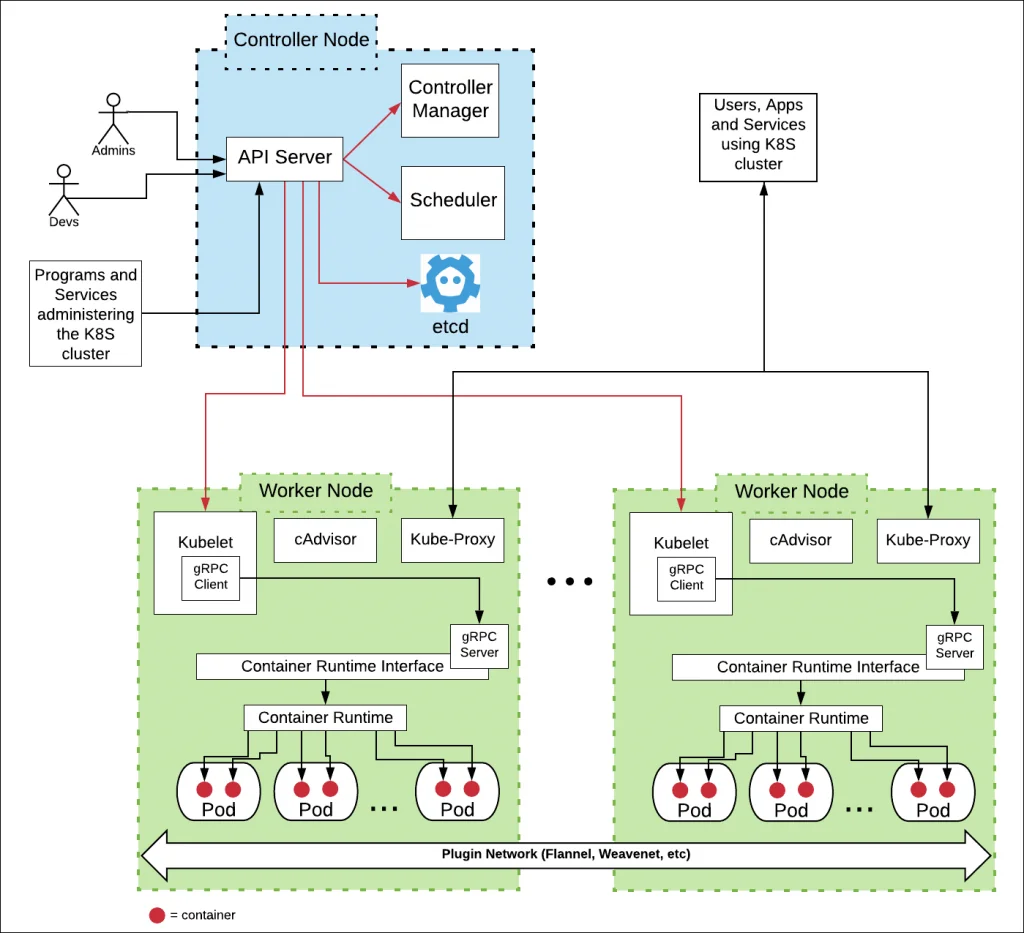
d Figure 1: Key factors in the Docker and Kubernetes kubelet vs kubectl command comparison.
Notice in Figure 1 above that every worker node in a Kubernetes cluster will have an instance of Kubelet running. When it’s time to create a pod and container(s), mechanisms in the Kubernetes controller node inform an instance of Kubelet running on a particular worker node to interact with the node’s container runtime to create the required container(s). Kubelet works with the controller node to organize the container according to its associated pod.
Kubelet and Kubernetes nodes
Remember, every node (virtual or physical machine) in a Kubernetes cluster will have an instance of Kubelet running. The following command will return the location of the Kubelet on a Linux machine
which kubeletYou’ll get output similar to the following
/usr/bin/kubeletIf you want to find out the details about kubelet, execute the following command:
kubelet --helpThe kubelet vs kubeclt comparison boils down to this: kubelet is Kubernetes’s mechanism for creating containers in a worker node, while kubectl is the CLI tool that developers use for interacting with a Kubernetes cluster. If you know which piece of the Kubernetes architecture you need to interact with, the choice between kubectl and kubelet will be clear.