

Spring profiles let an application register different beans and configuration depending on the active environment. A profile can represent production, development, testing, staging or any other deployment context that matters to the application.
Profiles are commonly associated with environment-specific configuration files such as application-prod.properties or application-test.yml. The @Profile annotation adds another capability: it controls whether a Spring component or configuration class is registered in the application context.
This is especially useful when different environments need different implementations of the same interface.
Spring @Profile annotation example
Consider a number-guessing application. In production, the game should generate a random number. In an automated test, however, a predictable value makes the behavior easier to verify.
Both implementations can satisfy the same NumberGenerator interface, while @Profile determines which implementation Spring creates.
public interface NumberGenerator {
    int getNumber();
}
import org.springframework.context.annotation.Profile;
import org.springframework.stereotype.Component;
@Component
@Profile("prod")
public class RandomNumberGenerator
implements NumberGenerator {
@Override
public int getNumber() {
return (int) (Math.random() * 10);
}
}import org.springframework.context.annotation.Profile;
import org.springframework.stereotype.Component;
@Component
@Profile("test")
public class StaticNumberGenerator
implements NumberGenerator {
@Override
public int getNumber() {
return 7;
}
}When the prod profile is active, Spring registers RandomNumberGenerator. When test is active, Spring registers StaticNumberGenerator.
Because both classes implement the same interface, another bean can depend on NumberGenerator without knowing which implementation was selected.
import org.springframework.stereotype.Service;

@Service
public class GuessingGame {

    private final NumberGenerator numberGenerator;

    public GuessingGame(NumberGenerator numberGenerator) {
        this.numberGenerator = numberGenerator;
    }

    public int getTargetNumber() {
        return numberGenerator.getNumber();
    }
}
Set the active Spring profile
In Spring Boot, one common way to activate a profile is with the spring.profiles.active property.
spring.profiles.active=prodFor YAML configuration, the equivalent is:
spring:
  profiles:
    active: prod
Spring can also load profile-specific configuration files automatically. For example, when the prod profile is active, Spring Boot can load values from application-prod.properties in addition to the base application configuration.
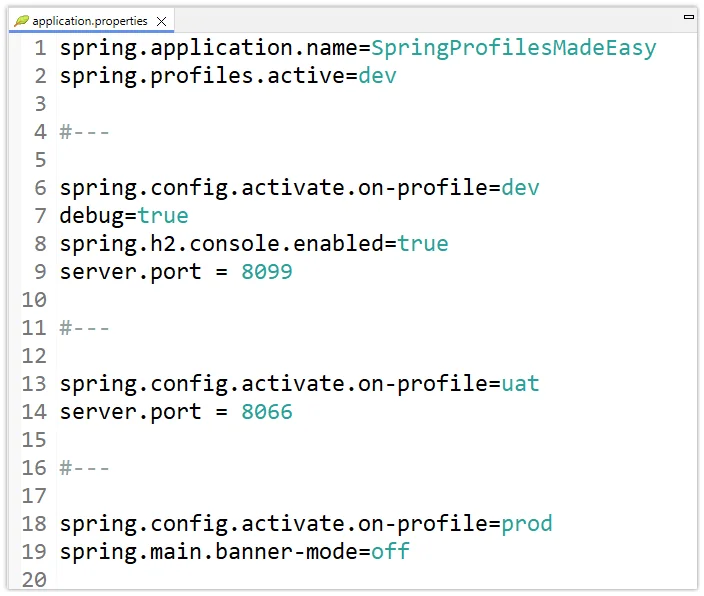
Override the active Spring profile
The active profile does not have to be hard-coded in application.properties. It can be supplied externally so the same application artifact behaves differently in each environment.
For example, pass it as a command-line argument:
java -jar app.jar --spring.profiles.active=prodOr set the corresponding environment variable:
SPRING_PROFILES_ACTIVE=prodThis is usually preferable to editing the packaged application when it moves from development to test or production.
Where can @Profile be used?
@Profile is most commonly used on Spring-managed component classes and configuration classes. It can also be applied to individual @Bean methods.
import org.springframework.context.annotation.Bean;
import org.springframework.context.annotation.Configuration;
import org.springframework.context.annotation.Profile;

@Configuration
public class NumberGeneratorConfig {

    @Bean
    @Profile("prod")
    NumberGenerator productionNumberGenerator() {
        return new RandomNumberGenerator();
    }

    @Bean
    @Profile("test")
    NumberGenerator testNumberGenerator() {
        return new StaticNumberGenerator();
    }
}
This approach is useful when you want profile-specific bean creation without placing @Component directly on the implementation classes.
Profile expressions
A profile condition can also express combinations. For example, this bean is active when either the dev or test profile is enabled:
@Profile("dev | test")
@Component
class DiagnosticNumberGenerator
        implements NumberGenerator {

    @Override
    public int getNumber() {
        return 7;
    }
}
You can also negate a profile:
@Profile("!prod")
@Component
class NonProductionDiagnostics {
}
Spring @Profile best practices
- Use profiles for environment-dependent bean registration and configuration.
- Keep business logic independent of profile names whenever possible.
- Prefer external profile activation over editing packaged application files.
- Make sure only one bean is eligible when several profile-specific implementations satisfy the same dependency, unless multiple beans are intentional.
- Use predictable profile-specific beans to simplify integration and application-context tests.
The key idea behind @Profile is simple: the application can depend on an interface while Spring decides which implementation belongs in the current environment. That keeps environment-specific decisions in configuration rather than scattering them throughout business logic.