

What’s the difference between next() and nextLine()?
The difference between the Java Scanner’s next() and nextLine() methods is that nextLine() returns every character in a line of text up to the line separator, excluding the separator, while next() returns the next token according to the Scanner's delimiter pattern.
Imagine someone passed the following phrase into a Java Scanner:
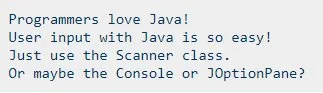
Sample text for the next() versus nextLine() example.
Calls to next() and nextLine()
In this case, the first call to next() returns a single word:
<span style="color: #003366">Programmers</span>In contrast to next(), nextLine() returns all of the text in a single line of input, right up to the first line break.
If the sample text above was passed to a Scanner and the nextLine() method was called, the output would be:
<span style="color: #003366">Programmers love Java!</span>That’s the fundamental difference between calls to next() and nextLine(). One returns the next token, while the other returns the remainder of the current line up to the line separator.
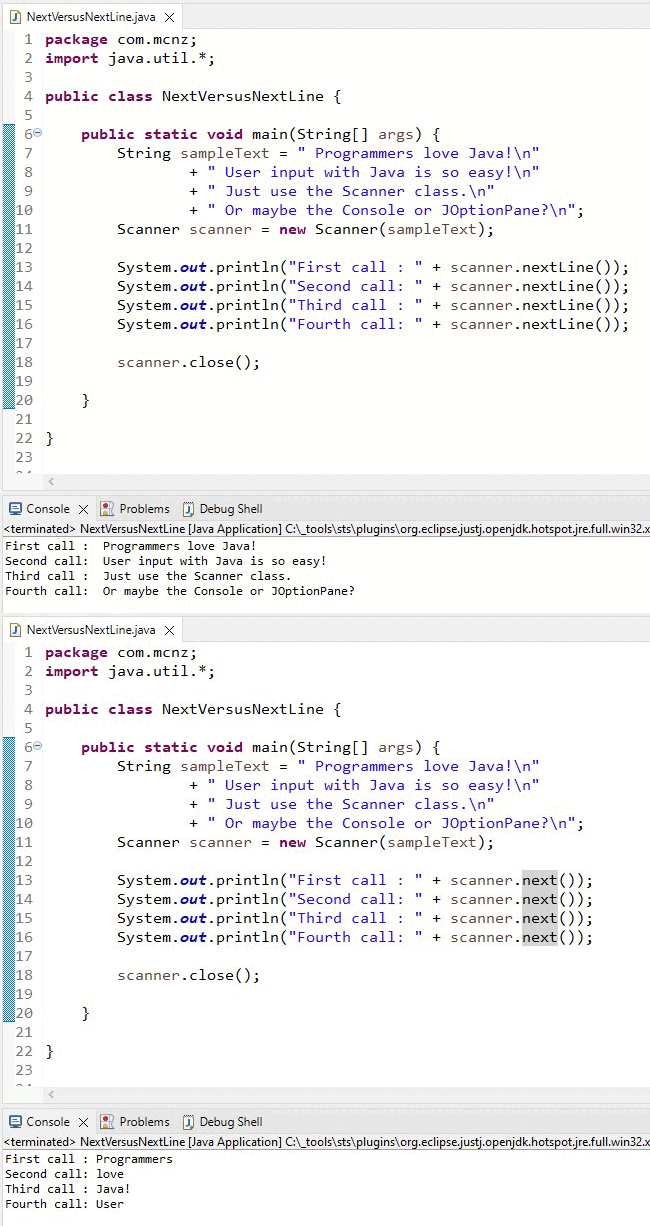
This next() vs. nextLine() example shows the difference between the two Java Scanner methods.
Scanner next() vs. nextLine() comparison
The following chart compares what the Java Scanners next() and nextLine() methods would return on four subsequent calls of the following sample text:
<span style="color: #003366">Programmers love Java!


User input with Java is so easy!


Just use the Scanner class.


Or maybe the Console or JOptionPane?</span>| Iteration | next() method output | nextLine() method output |
First iteration |
Programmers |
Programmers love Java! |
Second iteration |
love |
User input with Java is so easy! |
Third iteration |
Java! |
Just use the Scanner class. |
Fourth iteration |
User |
Or maybe the Console or JOptionPane? |
Java next() vs. nextLine() example
As with any concept in Java, the best way to solidify your understanding of the difference between the next() and nextLine() methods is to actually write some code.
Code the following next() versus nextLine() example yourself and compare how the two Scanner methods are different:
import java.util.Scanner;

void main() {
  var sampleText = """
      Programmers love Java!
      User input with Java is so easy!
      Just use the Scanner class.
      Or maybe the Console or JOptionPane?
      """;

  try (var scanner = new Scanner(sampleText)) {
    IO.println("First call : " + scanner.nextLine());
    IO.println("Second call: " + scanner.nextLine());
    IO.println("Third call : " + scanner.next());
    IO.println("Fourth call: " + scanner.next());
  }
}
When this code runs, the output is:
<span style="color: #003366">First call : Programmers love Java!


Second call: User input with Java is so easy!


Third call : Just


Fourth call: use</span>
As you can see, the call to nextLine() prints out an entire line of text, right up to the end of the line, while next() only prints out a single word at a time.
Delimiters and String tokenization
When the Java Scanner’s next() method breaks a line of text up into individual words, that’s known as tokenization.
By default, the next() method creates a new token each time it sees whitespace. The character that triggers tokenization is known as a delimiter.
The Scanner class allows you to change the delimiter to any valid text String. So if you wanted to tokenize text based on colons instead of whitespace, you just create the Java Scanner like this:
var scanner = new Scanner("How:now:brown:cow!").useDelimiter(":");Scanner next() vs. nextLine() summarized
When comparing the differences between next() and nextLine(), remember these important points:
- The nextLine() method returns all text up to a line break.
- The next() method returns the next token.
- The next() method uses whitespace as the default delimiter.
- You can change the delimiter of the next() method to any valid String.
With these key points in mind, you should have no difficulty understanding the difference between the Java Scanner’s next() and nextLine() methods.
 Cameron McKenzie is an AWS Certified AI Practitioner, Machine Learning Engineer, Solutions Architect and author of many popular books in the software development and Cloud Computing space. His growing YouTube channel training devs in Java, Spring, AI and ML has well over 30,000 subscribers.