

How to format a Java String in Java 25
Java's Formatter syntax still provides a compact way to build formatted Strings, but Java 25 gives small programs a cleaner way to display the result.
The new java.lang.IO class provides basic console output through IO.print() and IO.println(). Combine that with String.formatted() and you can replace many older System.out.printf() examples with simpler Java 25 code.
For Strings, the two most important conversion specifiers are:
%sto format text while preserving its normal case;%Sto format the result in uppercase.
Here's a compact Java 25 example:
void main() {
    var name = "Cameron";
    var site = "Tss";

    IO.println(
        "I like the articles %s writes on %S."
            .formatted(name, site)
    );
}
The result is:
I like the articles Cameron writes on TSS.This uses a Java 25 compact source file with void main(), so a small tutorial program no longer needs an explicit class declaration or public static void main(String[] args).
Java String formatting rules
For everyday String formatting, remember these rules:
- Use
%sto insert a String or the String representation of an object. - Use
%Sto uppercase the formatted result. - Add a number before
sto specify a minimum field width. - Use
-to left-align text within that field. - Use a precision such as
%.5swhen you intentionally want to limit the maximum number of characters displayed.
When using IO.println(), you normally do not need %n at the end of the format String because println() already writes the line separator.
%s vs. %S in Java
The lowercase %s conversion keeps the normal String representation:
void main() {
    IO.println("Hello, %s".formatted("Cameron"));
}Uppercase %S converts the formatted result to uppercase:
void main() {
    IO.println("Site: %S".formatted("Tss"));
}What happened to System.out.printf?
System.out.printf() is still valid Java 25 and remains useful when direct formatted output is exactly what you want:
System.out.printf(
    "I like the articles %s writes on %S.%n",
    name,
    site
);
However, IO does not provide an IO.printf() method. A modern Java 25 alternative is to build the formatted String first and then print it:
IO.println(
    "I like the articles %s writes on %S."
        .formatted(name, site)
);
This approach cleanly separates formatting from output.
String.formatted vs. String concatenation
String concatenation is perfectly reasonable for small expressions:
void main() {
    var name = "Cameron";
    var site = "Tss";

    IO.println(
        "I like the articles " + name +
        " writes on " + site + "."
    );
}
But formatting placeholders are often easier to read when the sentence contains several inserted values:
void main() {
    var name = "Cameron";
    var site = "Tss";

    IO.println(
        "I like the articles %s writes on %S."
            .formatted(name, site)
    );
}
For SQL, JPQL and other long structured Strings, text blocks are often an even better option than either concatenation or a giant format String.
Java String Formatter syntax
The general String conversion syntax is:
%[argument_index$][flags][width][.precision]sCommon String patterns include:
| Pattern | Meaning |
|---|---|
%s | Format the value as a String. |
%S | Format and uppercase the result. |
%20s | Use a minimum width of 20 and right-align. |
%-20s | Use a minimum width of 20 and left-align. |
%.5s | Display no more than five characters. |
%-10.5s | Display at most five characters in a left-aligned field of width 10. |
Right-align String output
A width specifier creates a field with at least that many characters. Strings are right-aligned by default:
void main() {
    IO.println("|%10s|".formatted("Java"));
}Left-align String output
Add the - flag to left-align the String:
void main() {
    IO.println("|%-10s|".formatted("Java"));
}Limit the number of displayed characters
String precision specifies the maximum number of characters that may be written:
void main() {
    IO.println("%.5s".formatted("JavaScript"));
}This is useful when fixed-width output must prevent unexpectedly long Strings from breaking the layout.
Use explicit Locale with %S when case rules matter
Uppercase formatting is locale-sensitive. For deterministic locale-specific formatting, use String.format() and provide the desired Locale explicitly:
void main() {
    var output = String.format(
        Locale.US,
        "Site: %S",
        "Tss"
    );

    IO.println(output);
}
Compact source files automatically import public top-level classes from packages exported by java.base, so this Java 25 example can use Locale without an explicit import.
Create a formatted table with Java 25 IO
Field width becomes particularly useful when creating aligned text tables.
void main() {
    IO.println("--------------------------------");
    IO.println(" Java's Primitive Types");
    IO.println("--------------------------------");
    IO.println(
        "| %-10s | %-8s | %4s |"
            .formatted("CATEGORY", "NAME", "BITS")
    );
    IO.println("--------------------------------");

    IO.println(
        "| %-10s | %-8s | %4s |"
            .formatted("Floating", "double", "64")
    );
    IO.println(
        "| %-10s | %-8s | %4s |"
            .formatted("Floating", "float", "32")
    );
    IO.println(
        "| %-10s | %-8s | %4s |"
            .formatted("Integral", "long", "64")
    );
    IO.println(
        "| %-10s | %-8s | %4s |"
            .formatted("Integral", "int", "32")
    );
    IO.println(
        "| %-10s | %-8s | %4s |"
            .formatted("Integral", "char", "16")
    );
    IO.println(
        "| %-10s | %-8s | %4s |"
            .formatted("Integral", "short", "16")
    );
    IO.println(
        "| %-10s | %-8s | %4s |"
            .formatted("Integral", "byte", "8")
    );
    IO.println(
        "| %-10s | %-8s | %4s |"
            .formatted("Boolean", "boolean", "1")
    );

    IO.println("--------------------------------");
}
The formatted output looks like this:
--------------------------------
 Java's Primitive Types
--------------------------------
| CATEGORY   | NAME     | BITS |
--------------------------------
| Floating   | double   |   64 |
| Floating   | float    |   32 |
| Integral   | long     |   64 |
| Integral   | int      |   32 |
| Integral   | char     |   16 |
| Integral   | short    |   16 |
| Integral   | byte     |    8 |
| Boolean    | boolean  |    1 |
--------------------------------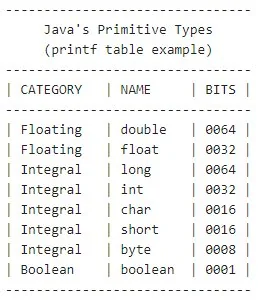
Field width makes Java String formatting useful for console tables and reports.
A more maintainable Java 25 table example
If the data is repetitive, move the rows into a small record and use a loop rather than repeating the formatting call:
record Primitive(
    String category,
    String name,
    int bits
) {}

void main() {
    var types = List.of(
        new Primitive("Floating", "double", 64),
        new Primitive("Floating", "float", 32),
        new Primitive("Integral", "long", 64),
        new Primitive("Integral", "int", 32),
        new Primitive("Integral", "char", 16),
        new Primitive("Integral", "short", 16),
        new Primitive("Integral", "byte", 8),
        new Primitive("Boolean", "boolean", 1)
    );

    IO.println(
        "| %-10s | %-8s | %4s |"
            .formatted("CATEGORY", "NAME", "BITS")
    );

    for (var type : types) {
        IO.println(
            "| %-10s | %-8s | %4d |".formatted(
                type.category(),
                type.name(),
                type.bits()
            )
        );
    }
}
This version is a better demonstration of modern Java because the data is modeled separately from the display logic.
Use text blocks for multi-line templates
Formatter-style placeholders also work well inside text blocks. For example:
void main() {
    var name = "Cameron";
    var language = "Java 25";

    var message = """
        Developer: %s
        Language:  %s
        Status:    ready
        """.formatted(name, language);

    IO.print(message);
}
This is often much easier to maintain than building a multi-line String with concatenation or repeated newline escapes.
Run the Java 25 compact source file
Save a compact program as StringFormat.java:
void main() {
    var name = "Cameron";
    IO.println("Hello, %s!".formatted(name));
}
Run it directly:
java StringFormat.javaOr compile and run it normally:
javac StringFormat.java
java StringFormat
Java 25 String formatting cheat sheet
| Goal | Example |
|---|---|
| Insert a String | IO.println("Hello %s".formatted(name)); |
| Uppercase formatted String | IO.println("%S".formatted(name)); |
| Right-align to width 10 | IO.println("%10s".formatted(name)); |
| Left-align to width 10 | IO.println("%-10s".formatted(name)); |
| Limit to five characters | IO.println("%.5s".formatted(name)); |
For modern Java 25 tutorials, the combination of String.formatted(), compact source files and IO.println() keeps String formatting examples concise without giving up the familiar power of Java's Formatter syntax.